
Android developer resume example
A practical Indian Android developer resume format, with sample statements for freshers and experienced applicants.
The button opens the existing template and role-starter flow. Where no matching starter exists, start blank and copy suitable statements below.
Sample resume, not a real candidate
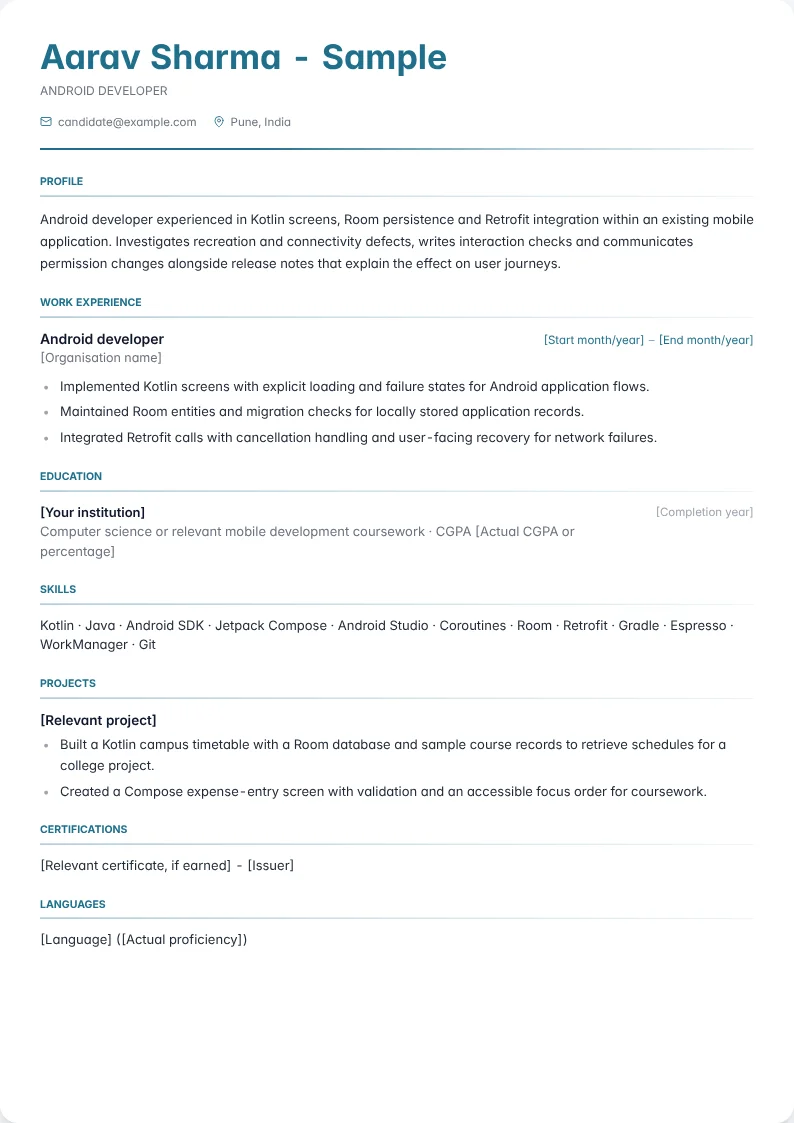
Aarav Sharma is fictional. Institution, organisation, grades and date fields are placeholders. Replace them with your real details. This is the Modern Clean layout.
Match the native Android vacancy
Search Indian openings for Android developer, Kotlin developer, Android application developer and junior mobile developer. Read whether the work uses native Android SDK code, Compose screens or an existing view-based application. Recruiters may first check Kotlin, lifecycle knowledge and a working app demonstration. Put the native stack and a user journey near the opening project. A campus timetable is useful for persistence and navigation; an expense form can show state and validation. Match the summary to the vacancy's application responsibilities and requested degree. If earlier work used a cross-platform framework, retain that context and show completed native Android tasks separately so interviewers can assess the relevant preparation.
Show an app journey from input to saved state
Present a notes app, timetable or booking prototype with a clear starting screen and completed task. Explain where input is validated, how the screen observes state and where Room stores the record. Include navigation, loading and retry states in the demonstration. A repository can provide Android Studio and Gradle setup steps plus the emulator configuration used. For a team project, identify your screen, storage logic or interaction checks. Internship work can lead when it includes an implemented feature and mentor feedback. Experienced developers can start with a recreation fix, persistence migration or Retrofit integration, while senior applicants can add state ownership reviews and the reasoning behind a reusable mobile component.
Prepare lifecycle and connectivity explanations
Practise what happens during activity recreation, app reopening and interrupted network access in your own implementation. Explain which data belongs in saved state, a ViewModel or local persistence. A Room example can show an entity change and the migration check used to retain stored records. For coroutines, describe cancellation and keeping long-running work off the main thread. Retrofit work can show how a failed request reaches a retry state. Technical rounds may also explore WorkManager constraints and background scheduling. Prepare an Espresso interaction that submits a form or follows navigation, then describe manual checks for keyboard behaviour and offline recovery. Link each explanation to the mobile feature rather than isolated library definitions.
Show degree results and mobile learning clearly
Give the qualification, institution and completion year or expected graduation date in education. Campus recruitment may request marks and eligible branches; include the official percentage or CGPA with its scale when the notice asks. Follow the institution's documented conversion rule for a percentage field. Mobile development coursework can sit beside the app project, with subjects such as object-oriented programming and databases supporting Kotlin and Room choices. A supervised Android internship deserves a dated entry naming the feature implemented. For experienced candidates, put maintained application work first and keep academic details compact. Mention relevant course exercises when they produced an original screen, migration test or lifecycle investigation worth discussing during the interview.
Use current learning and retain historical credentials
Google's Associate Android Developer certification programme is retired. If you earned it previously, give the exact historical title and award date; use current official Android developer material for new learning plans. Codelabs and developer courses can support preparation when you explain the feature built through them. Kotlin or mobile course certificates should retain the provider's actual awarded name. Select learning around a practical gap, such as Compose state, Room migrations or coroutine cancellation, then add a project task that demonstrates it. Native Android vacancies may use coding and debugging assessments, so prepare a reproducible app in addition to education and training. Check the advertisement for any specific learning requirement before arranging the credentials section.
Prepare the device walkthrough and shared files
Keep prototype, internship and release responsibilities accurate; omit private screens, signing keys and customer identifiers from public demonstrations. Before submission, open the app link, follow build instructions and complete the main journey on the emulator or device used in your notes. Check keyboard focus, semantic labels and a recoverable network failure. Have an explanation ready for manifest permissions and the local data retained after reopening. List release participation as a concrete task, such as testing a candidate build. Confirm location and joining availability when requested. An interview walkthrough can then focus on the screen state, persistence and device behaviour you implemented rather than screenshots alone.
Key skills and tools
- Kotlin
- Java
- Android SDK
- Jetpack Compose
- Android Studio
- Coroutines
- Room
- Retrofit
- Gradle
- Espresso
- WorkManager
- Git
Soft skills
- User empathy
- Lifecycle reasoning
- Design collaboration
- Release communication
- Practical troubleshooting
- Attention to accessibility
Copy only statements that match your actual work. Replace bracketed metrics only with verified values, or remove the number. These suggested revisions are examples, not claims about a real candidate.
Fresher and project bullet examples
Built a Kotlin campus timetable with a Room database and sample course records to retrieve schedules for a college project.
Created a Compose expense-entry screen with validation and an accessible focus order for coursework.
Tested a college Android app under offline conditions and documented its recovery when access returned.
Developed a local notes application that preserved unsaved input during activity recreation checks.
Presented an Android internship prototype with navigation diagrams and mentor-reviewed device test notes.
Experienced bullet examples
Implemented Kotlin screens with explicit loading and failure states for Android application flows.
Maintained Room entities and migration checks for locally stored application records.
Integrated Retrofit calls with cancellation handling and user-facing recovery for network failures.
Wrote Espresso interaction checks for form submission, navigation and persisted screen state.
Reviewed coroutine usage to keep long-running work outside the Android main thread.
Developed Jetpack Compose components with semantic labels and consistent state ownership.
Investigated activity recreation defects and preserved appropriate inputs across configuration changes.
Configured WorkManager tasks with documented constraints and safe retry behaviour.
Resolved [N] Android defects with emulator reproduction steps and focused release regression checks.
Documented permission requests and removed unnecessary access from application manifest changes.
Three summary examples
Computer science graduate with Kotlin and Android coursework focused on local storage, lifecycle handling and usable forms. Built a campus timetable and notes application with documented emulator checks, demonstrating persistent screen state and offline recovery for a junior Android developer role.
Android developer experienced in Kotlin screens, Room persistence and Retrofit integration within an existing mobile application. Investigates recreation and connectivity defects, writes interaction checks and communicates permission changes alongside release notes that explain the effect on user journeys.
Senior Android developer with responsibility for mobile architecture reviews, state ownership and release-risk discussions across Android features. Guides lifecycle-aware implementation and accessible interactions while helping teams evaluate persistence changes, background constraints and realistic device verification before a release.