
Resume Ground resources
Frontend developer resume example
A practical Indian frontend developer resume format, with sample statements for freshers and experienced applicants.
The button opens the existing template and role-starter flow. Where no matching starter exists, start blank and copy suitable statements below.
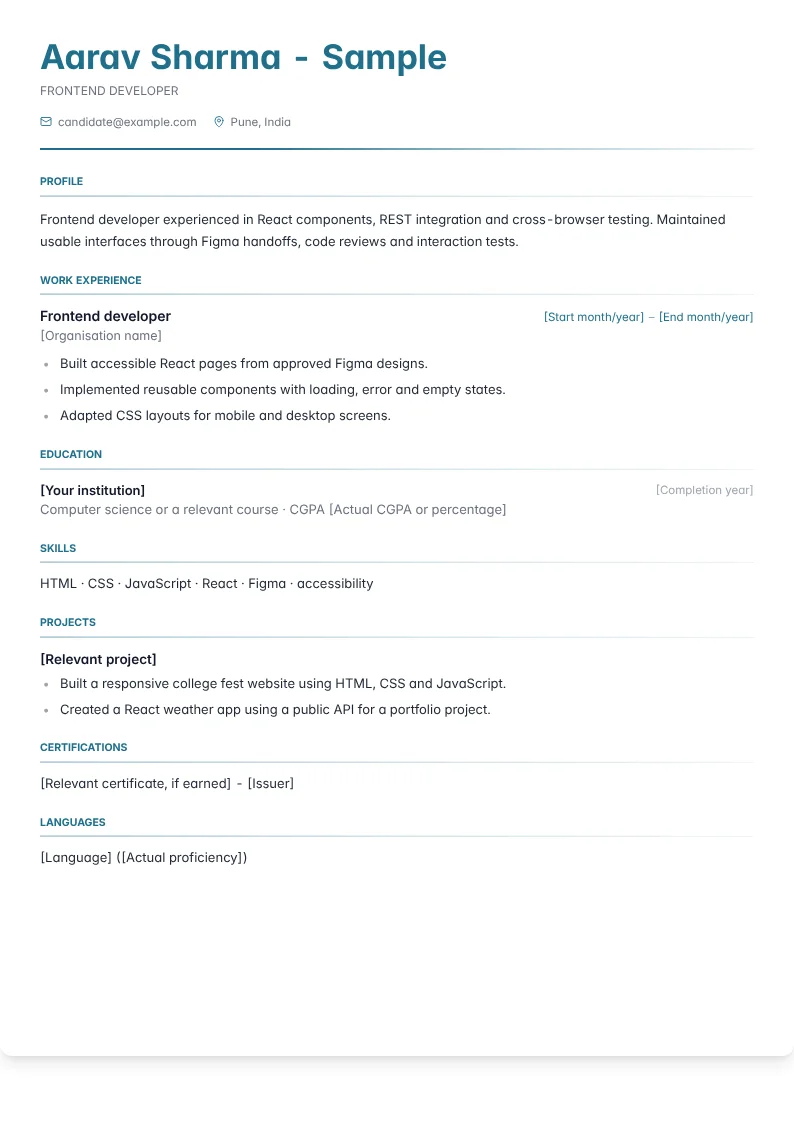
Sample resume, not a real candidate
Aarav Sharma is fictional. Institution, organisation, grades and date fields are placeholders. Replace them with your real details. This is the Modern Clean layout.
Let reviewers inspect the interface
Frontend hiring starts with something unusually tangible: a reviewer can open your work and experience it. Choose examples that demonstrate interaction quality rather than merely an attractive screenshot. A useful project link should load reliably, explain its purpose, and offer a clear path through its main task. Recruiters in India may screen for a named framework, JavaScript or TypeScript experience, responsive implementation, and compatibility with the advertised work arrangement. Technical reviewers then look for evidence beneath the surface. Show that you considered keyboard access, loading behaviour, form feedback, and narrow screens. If a demonstration depends on a backend that may be unavailable, provide a clearly labelled preview mode or recorded walkthrough.
Explain components through user behaviour
Organise experience around journeys such as searching a catalogue, correcting a form, or completing an account setup. Explain where state lives, how components communicate, and what happens when a request fails. This makes framework knowledge observable without turning the resume into a library inventory. Mention collaboration with designers through a concrete decision, such as resolving a responsive layout conflict or clarifying an interaction specification. Accessibility deserves similarly specific treatment: describe focus handling or semantic controls only when you implemented them. Where performance work is relevant, identify the diagnosed cause and the verification method. Avoid asserting that an interface became faster unless you can explain the comparison and its limitations during a technical discussion.
Match the portfolio to your experience
A fresher can demonstrate readiness through an original interface with meaningful states, not just a copied landing page. Include empty results, validation errors, delayed responses, and a sensible mobile layout. Explain which design assets were supplied and which interaction decisions were yours. An experienced developer should show broader responsibility through component APIs, migration work, design system adoption, or release coordination. Public code is useful, but a private commercial product can be discussed through an authorised case study. Coursework and framework certificates may provide optional context; submit a particular credential if the vacancy asks for it. A brief README describing setup, accessibility choices, and known limitations often gives reviewers more usable evidence than a gallery of unexplained badges.
Make an interface bullet specific
Use this hypothetical example to replace a visual claim with observable implementation work. • Before: Created a responsive and user friendly dashboard using React. • After: Built a React reporting dashboard with keyboard accessible filters, URL preserved selections, and distinct loading, empty, and error states. The second version gives a reviewer several behaviours to inspect and gives you clear interview topics. It does not assume that the dashboard improved conversion or user satisfaction. Keep only the details that genuinely apply to your project. You can add a separate sentence explaining why filter state belonged in the URL, how the controls were tested, or what tradeoff you made when supporting smaller screens within the available design constraints.
Avoid four portfolio credibility gaps
First, a polished screenshot without a working interaction leaves reviewers unable to assess frontend engineering. Second, listing accessibility as a skill while using mouse only controls creates a visible contradiction. Third, copying a popular tutorial without attribution makes authorship difficult to establish. Fourth, treating a successful desktop render as proof of responsive quality overlooks overflow, touch targets, and content wrapping. Audit your examples before applying. Navigate without a mouse, test forms with unexpected input, and inspect the page with realistic content rather than ideal placeholder text. If a limitation remains, document it plainly. A smaller interface whose behaviour you understand is stronger evidence than an elaborate demonstration assembled from dependencies you cannot explain.
Prepare the handoff from recruiter to technical panel
Make your primary framework and recent interface responsibilities visible near the top of the application. Indian recruiters may need to confirm whether your experience is hands on, whether you can join under the required arrangement, and whether your background matches the requested frontend stack. Answer those questions directly without changing job titles or overstating years of use. For technical rounds, prepare to trace an interaction from a user event through state changes, network activity, rendering, and feedback. Be ready to explain browser behaviour rather than relying entirely on framework terminology. Discuss how you receive design feedback, review pull requests, and prevent regressions when shared components change. Those details connect interface craft with dependable team delivery.
Arrange the evidence for this application
Put the live interface or authorised walkthrough beside your contact details. Follow with frontend experience, interaction-focused projects and a compact browser/framework skills list. A graduate can move the project ahead of employment so a reviewer can inspect it immediately. Leave design-tool courses below evidence of functioning interfaces, not above it.
Key skills and tools
- HTML
- CSS
- JavaScript
- React
- Figma
- accessibility
Copy only statements that match your actual work. Replace bracketed metrics only with verified values, or remove the number. These suggested revisions are examples, not claims about a real candidate.
Fresher and project bullet examples
Built a responsive college fest website using HTML, CSS and JavaScript.
Created a React weather app using a public API for a portfolio project.
Converted Figma screens into a course registration form during a frontend internship.
Fixed mobile navigation issues on an internship team's staging website.
Added keyboard-accessible filters to a student book exchange project.
Published a personal portfolio with project demos and GitHub source links.
Experienced bullet examples
Built accessible React pages from approved Figma designs.
Implemented reusable components with loading, error and empty states.
Adapted CSS layouts for mobile and desktop screens.
Validated form inputs and displayed field-level error messages.
Connected React screens to REST APIs with retry handling.
Tested keyboard navigation and labelled controls for screen readers.
Reduced page load time by [X]% through image compression and code splitting.
Fixed layout regressions across Chrome, Firefox and Safari.
Wrote React Testing Library tests for [N] user interactions.
Documented component props and interaction states in Storybook.
Converted repeated styles into shared CSS modules.
Reviewed pull requests for semantic HTML and consistent component behaviour.
Three summary examples
Frontend fresher with hands-on HTML, CSS, JavaScript and React projects. Created responsive pages with accessible forms and API-driven content.
Frontend developer experienced in React components, REST integration and cross-browser testing. Maintained usable interfaces through Figma handoffs, code reviews and interaction tests.
UI development candidate with a frontend internship and a background in design or another field. Connects Figma layouts with semantic HTML, responsive CSS and tested React behaviour.
Frequently asked questions
Is a live website necessary?
It is valuable but not always possible. A clear recording, accessible repository, and explanation of constraints can still demonstrate the work.
Should I include design tools?
Include tools you actually use for implementation handoff or collaboration. Do not imply product design ownership if you only inspected supplied designs.
Are tutorial projects acceptable for freshers?
They can show learning when attributed honestly. Add original behaviour and explain your decisions so reviewers can distinguish your contribution.
How should I present accessibility experience?
Describe implemented behaviour such as focus restoration, labelled inputs, or keyboard navigation. Avoid broad compliance claims without a defensible assessment.